






Reaper Malware Hijacks macOS Script Editor to Steal Crypto Wallet Data
A macOS-targeting malware strain known as Reaper has been identified abusing Apple’s built-in Script Editor to steal cryptocurrency wallet data, raising fresh concerns for digital asset holders who rely on Mac devices.
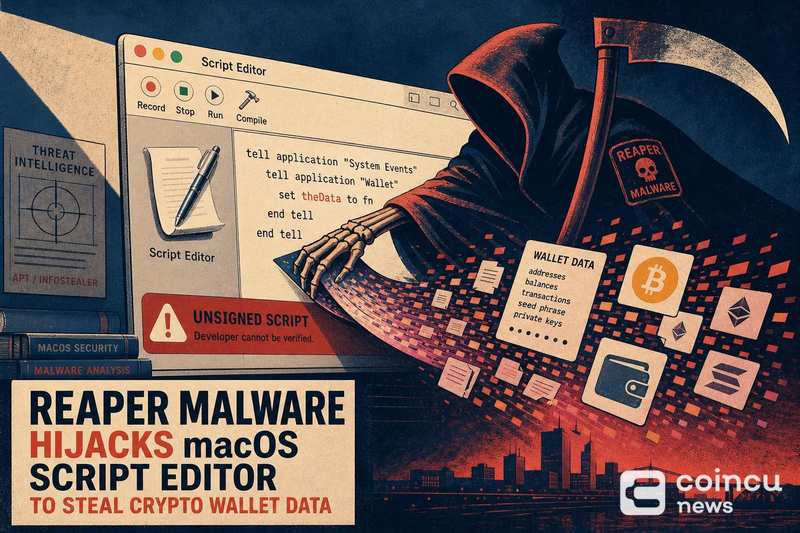
Security researchers at SentinelOne published findings on a macOS infostealer variant that spoofs trusted brands, including Apple, Google, and Microsoft, as part of a multi-stage attack chain. The malware leverages legitimate system tools to avoid detection while targeting sensitive user data, including cryptocurrency wallet credentials.
Mac users have long operated under the assumption that macOS is inherently safer than Windows against malware threats. That perception makes crypto holders on Apple devices a particularly attractive target, as they may be less likely to run dedicated endpoint protection or scrutinize system-level processes.
How Reaper Abuses a Trusted macOS Tool
Script Editor is a native macOS application designed for writing and running AppleScript and JavaScript for Automation (JXA) commands. It ships with every Mac and is signed by Apple, meaning its execution is trusted by the operating system’s built-in security layers.
By hijacking Script Editor, Reaper can execute malicious scripts under the cover of a legitimate Apple-signed process. This technique reduces the likelihood that security tools or the user will flag the activity as suspicious, since the commands appear to originate from a trusted system utility.
The attack chain reportedly involves spoofing well-known brands to lure victims into triggering the initial payload. Once active, the malware uses the scripting environment to access local files and credentials without raising standard Gatekeeper or notarization warnings that would normally alert macOS users to untrusted software, according to BleepingComputer’s reporting on the same malware family.
What Crypto Wallet Data May Be Exposed
Wallet-focused malware typically does not interact with blockchain networks directly. Instead, it targets the access-enabling data stored locally on a victim’s machine: wallet application files, browser extension data, saved credentials, and in some cases seed phrase backups.
Stolen wallet-access data can allow an attacker to reconstruct or import a victim’s wallet on a separate device. Unlike a compromised password, which can be reset, a compromised private key or seed phrase gives permanent access to on-chain funds unless the victim moves assets to a new wallet first.
This distinction matters. The funds themselves live on the blockchain, not on the local machine. But the keys that control those funds are often stored locally, and that is precisely what infostealers like Reaper are designed to extract. Incidents like the recent Bitcoin kidnapping case where an accomplice pleaded guilty illustrate how valuable access to crypto assets has become to criminals across both digital and physical attack vectors.
Immediate Steps After a Suspected Infection
If you suspect your Mac has been compromised, the priority is containment. Disconnect the device from the internet immediately to prevent further data exfiltration. Do not log into any wallet applications or exchanges on the affected machine.
Using a separate, clean device, access your wallets and move assets to freshly generated addresses. This step is critical because if wallet files or credentials were exfiltrated, the attacker may not have acted on them yet. Speed matters.
Do not enter your seed phrase into any “recovery” prompt, verification tool, or website you did not initiate yourself. Post-compromise phishing, where attackers use stolen data to craft convincing follow-up scams, is a common second-stage tactic. Even institutional investors managing significant positions are not immune to social engineering when attackers possess partial account information.
After securing assets, run a full malware scan using a reputable endpoint security tool. Review your Mac’s Login Items and any LaunchAgents or LaunchDaemons folders for unfamiliar entries. Consider a clean OS reinstall if you cannot confirm the full scope of the compromise.
For ongoing protection, enable macOS Lockdown Mode if you hold significant crypto assets, use hardware wallets for long-term storage, and avoid running scripts or granting accessibility permissions to applications you did not explicitly install. The fact that even small price movements can trigger billions in liquidations underscores how costly any delay in securing compromised wallet access can be.
FAQ
Is macOS Script Editor itself malware?
No. Script Editor is a legitimate Apple application included with macOS. The threat comes from malware abusing it as an execution vehicle, not from the tool itself. You do not need to delete or disable Script Editor, but you should be cautious about any unexpected prompts asking you to run scripts.
Can stolen wallet data lead to fund loss?
Yes. If an attacker obtains your private keys, seed phrases, or wallet application data, they can import your wallet and transfer funds. Unlike traditional bank fraud, blockchain transactions are irreversible. Moving assets to a new wallet from a clean device is the only reliable mitigation once keys are compromised.
What should I do first if I clicked something suspicious?
Disconnect from the internet, do not open any wallet applications on the affected device, and use a separate clean device to move crypto assets to new wallet addresses. Then run a full security scan and consider reinstalling macOS.
Disclaimer: This article is for informational purposes only and does not constitute financial or investment advice. Cryptocurrency and digital asset markets carry significant risk. Always do your own research before making decisions.
No tags available.


Other Posts








- China, US Conclude Trade Talks with Focus on Cooperation
- Crypto Weekly: NYSE Backs OKX, Kraken Gets Fed Access, BTC Sells
- Court Upholds Fed’s Rejection of Custodia Bank’s Request
- Former CFO Convicted for $35M Fraudulent Crypto Investment
- DeriW Launches Edge Hour Trading Competition Platform for Derivatives Traders
- Michael Saylor Denies Bitcoin Sell-Off Amid Large BTC Transfer
- Buy Dogecoin on eToro: Step-by-Step Guide for Beginners (2024)
- Kazakhstan Explores Crypto Reserves Backed by National Funds
- JPMorgan Increases Holdings in BlackRock’s Bitcoin ETF
- Nordea Bank Introduces Bitcoin ETP Trading for Nordic Customers
- XRP Spot ETF Launches on Nasdaq Amid Market Fluctuations
- Peter Schiff Challenges Michael Saylor on MSTR’s Business Model
- Thailand Orders Worldcoin to Delete 1.2 Million Biometric Records
- UK Proposes New DeFi Tax Framework to Ease User Burden
- WLFI Under Fire: Analyst Warns Hyperliquid Could Be Next
- Ancient Ethereum Whale Moves $1.19 Billion After Decade
- BlackRock Receives Large Crypto Transfers from Coinbase
- SEC Scrutiny on ALT5 Sigma’s Leadership Disclosure Timing
- Yala Injects $5.5 Million Amid Recovery Efforts
- Radiant Capital Faces $50M Loss in Major Security Breach
- China, US Conclude Trade Talks with Focus on Cooperation
- Crypto Weekly: NYSE Backs OKX, Kraken Gets Fed Access, BTC Sells
- Court Upholds Fed’s Rejection of Custodia Bank’s Request
- Former CFO Convicted for $35M Fraudulent Crypto Investment
- DeriW Launches Edge Hour Trading Competition Platform for Derivatives Traders
- Michael Saylor Denies Bitcoin Sell-Off Amid Large BTC Transfer
- Buy Dogecoin on eToro: Step-by-Step Guide for Beginners (2024)
- Kazakhstan Explores Crypto Reserves Backed by National Funds
- JPMorgan Increases Holdings in BlackRock’s Bitcoin ETF
- Nordea Bank Introduces Bitcoin ETP Trading for Nordic Customers
- XRP Spot ETF Launches on Nasdaq Amid Market Fluctuations
- Peter Schiff Challenges Michael Saylor on MSTR’s Business Model
- Thailand Orders Worldcoin to Delete 1.2 Million Biometric Records
- UK Proposes New DeFi Tax Framework to Ease User Burden
- WLFI Under Fire: Analyst Warns Hyperliquid Could Be Next
- Ancient Ethereum Whale Moves $1.19 Billion After Decade
- BlackRock Receives Large Crypto Transfers from Coinbase
- SEC Scrutiny on ALT5 Sigma’s Leadership Disclosure Timing
- Yala Injects $5.5 Million Amid Recovery Efforts
- Radiant Capital Faces $50M Loss in Major Security Breach
- China, US Conclude Trade Talks with Focus on Cooperation
- Crypto Weekly: NYSE Backs OKX, Kraken Gets Fed Access, BTC Sells
- Court Upholds Fed’s Rejection of Custodia Bank’s Request
- Former CFO Convicted for $35M Fraudulent Crypto Investment
- DeriW Launches Edge Hour Trading Competition Platform for Derivatives Traders
- Michael Saylor Denies Bitcoin Sell-Off Amid Large BTC Transfer
- Buy Dogecoin on eToro: Step-by-Step Guide for Beginners (2024)
- Kazakhstan Explores Crypto Reserves Backed by National Funds
- JPMorgan Increases Holdings in BlackRock’s Bitcoin ETF
- Nordea Bank Introduces Bitcoin ETP Trading for Nordic Customers
- XRP Spot ETF Launches on Nasdaq Amid Market Fluctuations
- Peter Schiff Challenges Michael Saylor on MSTR’s Business Model
- Thailand Orders Worldcoin to Delete 1.2 Million Biometric Records
- UK Proposes New DeFi Tax Framework to Ease User Burden
- WLFI Under Fire: Analyst Warns Hyperliquid Could Be Next
- Ancient Ethereum Whale Moves $1.19 Billion After Decade
- BlackRock Receives Large Crypto Transfers from Coinbase
- SEC Scrutiny on ALT5 Sigma’s Leadership Disclosure Timing
- Yala Injects $5.5 Million Amid Recovery Efforts
- Radiant Capital Faces $50M Loss in Major Security Breach


Minnesota Prediction Market Ban Paused for Kalshi and Polymarket


Bitmine Immersion Technologies (BMNR) Announces ETH Holdings Reach 5.79 Million Tokens, and Total Crypto and Total Cash Holdings of $11.8 Billion
Eightco Holdings (NASDAQ: ORBS) Announces its Participation in World Foundation’s $52.5M funding round as World Shifts From Building the Network to Scaling Utility